Reverse Image Search Techniques: The Definitive Guide to Finding Any Image Online (2026)
What are Reverse Image Search Techniques?
Reverse image techniques are methods for searching the internet using an image file instead of text. Each technique uses a different algorithm, pixel hash matching, visual similarity scoring, facial recognition, or multi-engine indexing, to locate where an image appears online, verify its origin, identify its subject, or detect unauthorized use.
The 5 main image search techniques are: exact match search, visual similarity search, keyword image search, facial and object recognition search, and multi-engine cross-platform search.
The Problem Every Reverse Image Technique Solves
Most people run one reverse image search, get poor results, and assume the image cannot be found. The real reason is almost never the image, it is the technique.
There are 5 distinct image search techniques. Each one uses a different algorithm, searches a different type of match, and works on different categories of image. Running an exact match search on a visually modified image will always fail, not because the tool is broken but because you applied the wrong technique to that specific situation. Running a facial recognition search on a landscape photograph wastes time for the same reason.
The technique mismatch problem is compounded by another issue:
- Search Engine Selection: Google, Bing, Yahoo, and Yandex each maintain independent image indexes built from different crawls of different pages. An image that returns zero results on Google may appear clearly on Bing. Concluding the image is unfindable after one search on one engine is one of the most common and most avoidable errors in reverse image searching.
This guide maps every image search technique to the situations where it works, identifies which engine handles each technique best, and shows how SnapZain Reverse Image Search tool applies 3 of the 5 techniques simultaneously across Google, Bing, and Yahoo in a single search, so you get the right technique on the right engine without running five separate searches manually.
Top 5 Reverse Image Techniques Explained
Reverse image search techniques are not variations of the same thing, they are 5 genuinely distinct methods that work differently, return different types of results, and serve different purposes.
Knowing what each one does is what separates a productive search from a dead end.
Technique 1: Exact Match Search (Pixel Hash Matching)
The foundational reverse image search technique. You upload an image file or paste an image URL, and the search engine converts it into a compact mathematical signature called an image fingerprint or perceptual hash. That fingerprint is compared against a database of pre-indexed fingerprints for billions of images across the web. Results ranked closest to zero numerical distance from your fingerprint are exact or near-exact matches.
This is the technique to use when your goal is to find where a specific image has been published online, to trace the original source of a photograph, discover where your own image has been copied without permission, verify whether a news photo is genuine, or locate the first known appearance of a viral image.
- What It Finds Well: Exact copies, lightly resized versions, mildly recompressed duplicates, the original publication of a photograph.
- Where it struggles: Images that have been flipped, heavily filtered, watermarked, or substantially cropped. Each of those modifications alters the image fingerprint enough to push results out of the matching threshold.
- Best Tool: SnapZain tool runs this technique across Google, Bing, and Yahoo simultaneously. Because each engine maintains a different index, an image with no result on Google may be clearly indexed on Bing, which is why single-engine exact match searches miss results that a multi-engine search surfaces.
Technique 2: Visual Similarity Search
This reverse image technique does not look for copies of your image. It looks for images that resemble your image, same subject, similar composition, comparable aesthetic, even if they are entirely different photographs taken at different times.
The algorithm assigns weighted scores to visual feature clusters (color distribution, edge patterns, texture data, spatial arrangement) and returns images scoring highly across multiple dimensions simultaneously. A search for a red leather handbag returns other red leather handbags that share the same shape, surface quality, and color weighting, not copies of your specific photograph.
This find image source technique is what most people are actually using when they describe "finding similar images." It powers product discovery in e-commerce, design inspiration searches, and the process of locating a higher-resolution version of a low-quality image you already have.
- What It Finds Well: Visually similar products, comparable photographs, higher-quality versions of a degraded image, related artworks or illustrations.
- Where It Struggles: Highly generic images, a plain blue sky, a grass field, an empty white room, match so many indexed images that results are too broad to be useful.
- Best Tool: Google Lens applies vision-based computing capabilities to visual similarity and is the strongest engine for this technique, particularly for product and object identification. SnapZain's URL search routes your query through Google and Bing simultaneously, giving you both engines' similarity results in one step.
Technique 3: Keyword Image Search (Hybrid Query)
Keyword image search technique solves a specific problem: you have an image but the image alone is too generic for exact match or visual similarity search to return focused results. You combine the visual query with descriptive text keywords to filter the result set.
You paste the image URL into a tool that accepts both visual and text inputs, add a keyword that contextualizes the subject, a brand name, a location, a date, a category, and the search engine uses both signals together to return results that match both the visual content and the text filter.
A photographer tracking unauthorised use of a product photo adds the client's brand name alongside the image URL. A researcher trying to locate a photograph from a specific country adds that country name to filter out visually similar images from other geographies. A journalist searching for the source of a conflict image adds a year or location name to narrow results to the relevant time and place.
- What It Finds Well: Specific instances of an image within a defined context, filtered results when visual search alone returns too much noise.
- Where It Struggles: If the keyword is too specific it can exclude valid results. If the image and keyword have no semantic overlap the filter may behave unexpectedly.
- Best Tool: SnapZain combines URL-based reverse image search with a built-in keyword input, making it one of the rare free platforms that allows genuine hybrid image search queries without needing extra steps or manual tricks. If you want to know how to do a reverse image search, SnapZain reverse image search tool is especially valuable for investigative and professional research use cases where context matters as much as visual matching.
Technique 4: Facial and Object Recognition Search
This search by image technique applies a fundamentally different approach. Rather than treating the whole image as a single fingerprint, it uses computer vision models to detect and isolate specific subjects within the image, a human face, a product, a logo, a landmark, and searches for that subject independently of the surrounding scene.
For Face Search Reverse Image, the algorithm maps facial geometry: the distance between eyes, the proportions of facial features, the structure of the jaw. It then searches for images where those proportions appear, regardless of the background, lighting, or camera angle. This is why face search can match a clear headshot to a blurry background appearance on a social media profile, the facial geometry signature matches even though nothing else about the two images is similar.
For object recognition, the algorithm identifies discrete categories, a chair, a plant species, a car model, a building, and returns information about what the object is and where similar objects appear online.
- What It Finds Well: The identity of a face in a photograph, information about an object or landmark, other appearances of a person's face across the web, product identification from a scene photograph.
- Where It Struggles: Accuracy degrades with very low image resolution, heavy obstruction of the subject, or unusual angles that prevent the algorithm from mapping facial or object geometry reliably. Privacy regulations in many jurisdictions limit the availability of public face search tools.
- Best Tool: Yandex Images is the strongest freely available tool for facial recognition, with particular depth of coverage for Eastern European web content. Google Lens leads on object and landmark identification. For detailed guidance, see our Yandex Reverse Image Search Guide.
Technique 5: Multi-Engine Cross-Platform Search
The 5th reverse image search technique is not a different algorithm, it is a different strategy. It recognizes that no single search engine indexes the entire web, and that the same image may be findable on Bing but absent from Google, or visible on Yahoo but not on either of the others.
Running a reverse image search tool across multiple engines produces a result set that is larger, more geographically diverse, and more complete than any single engine can provide. An image from a regional news site may be indexed by Yahoo but not Google. A product photo listed in Bing’s shopping index might not always be available within Google’s broader search index. An older photograph may have been crawled by Yahoo's historical index before Google cached the page.
This technique matters most for journalists conducting source verification (where you need to be confident an image does not appear anywhere online, not just on one engine), for e-commerce sellers tracking unauthorized product image use across multiple marketplaces, and for researchers trying to establish the earliest known publication of a specific photograph.
- What It Finds Well: Images that any single engine misses, the broadest possible set of pages where an image appears, cross-marketplace appearance of a product image.
- Where It Struggles: More results means more manual review time. Overlapping results across engines require deduplication.
- Best Tool: SnapZain free reverse image search tool is built specifically around this technique. Upload your image once or paste the URL once, and SnapZain submits your query to reverse Google image search, Bing, and Yahoo simultaneously, opening each result in a separate tab. No account. No downloads. No reformatting the query for each platform. The entire process takes under 60 seconds and produces a more complete picture than any single-engine search can match.
Which Reverse Image Search Technique Is For Your Situation?
Different goals call for best reverse image techniques. This table maps your specific situation to the right technique and the right tool, so you spend 30 seconds choosing rather than 30 minutes searching the wrong way.
How to Apply These Techniques Using SnapZain Reverse Image Search?
SnapZain's reverse image search tool is the fastest way to apply Techniques 1, 3, and 5 simultaneously, exact match search, keyword hybrid search, and multi-engine search, from a single interface.
Input Option A: File Upload
Navigate to SnapZain homepage and open the reverse image search tool. Click the upload area or drag your image file directly onto it. Accepted formats are JPG, PNG, GIF, WEBP, AVIF, and BMP, up to 10MB. Always upload the highest resolution, least modified version of the image you have. The more visual data the engine receives, the more precise the image fingerprint and the more accurate your results.
Select which engines to search. Running all three, Google, Bing, and Yahoo, applies Technique 5 (multi-engine search) and is the recommended default for any search where thoroughness matters. You can select each engine and it opens its results in a tab. For deeper understanding, see our guide Reverse Image Search Method for every device. Even if you are an iPhone user or have an Android device, you will get a detailed process to use this tool.
Input Option B: URL With Keyword Refinement
If the image is already hosted online, copy its direct URL (right-click any image in your browser and select "Copy image address"). Paste the URL into SnapZain's URL field. This applies Technique 1 using the image at its native hosted resolution, often producing better results than a downloaded and re-uploaded copy that may have been compressed in the process.
To apply Technique 3 (keyword hybrid search), add a descriptive keyword in the keyword field alongside the URL. This filter results using both the visual fingerprint and your text input simultaneously.
Reading Your Results
Each engine's results of the image reverse search tab shows a different slice of the web. An exact match on Google confirms the image is widely indexed. A result appearing only on Bing but not Google confirms the value of multi-engine search. Cross-reference the publication dates shown in each result to identify the earliest known indexed appearance, this is typically the original source.
Platform Comparison: Where Each Engine Excels
Understanding which platform handles which reverse image technique best prevents wasted searches and misread results.
Google and Google Lens
Google holds the largest image index of any search engine and its machine learning models are the strongest available for object identification, landmark recognition, and visual similarity search. Google Lens, integrated into Android, the Google app on iOS, and the Chrome browser, applies neural network embeddings that find visually similar images even when no exact duplicate is indexed.
Additional information you might need for specifically Google Reverse Image Search. However, Google lens is the right primary engine for:
- Object and product identification
- Landmark recognition
- Finding visually similar images
- General purpose reverse photo lookup for Western English-language content.
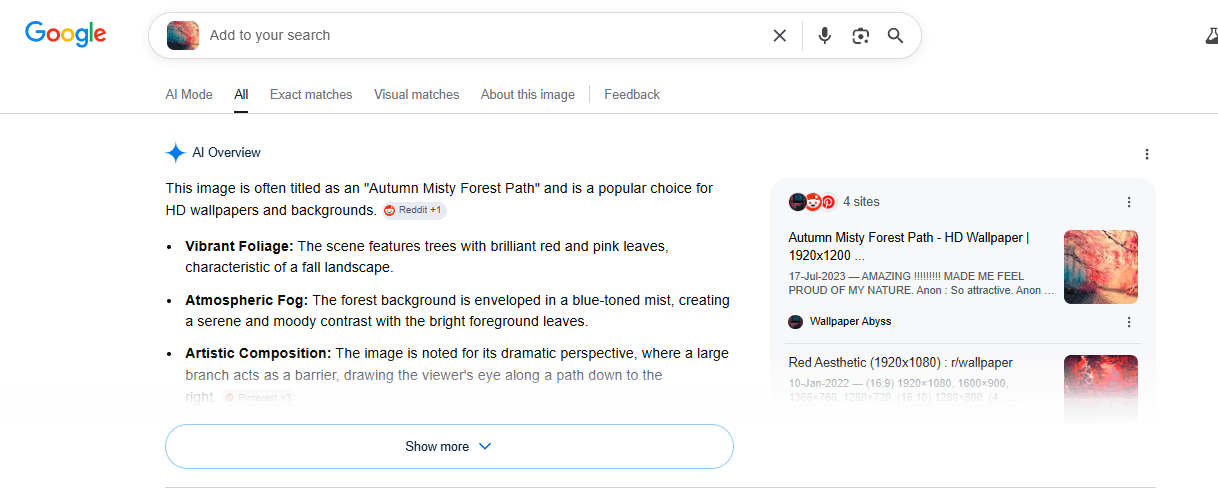
Reverse Image Search Google Underperforms on: Face search reverse image for private individuals (deliberately limited), Eastern European and non-English content, and exact duplicate detection compared to specialist tools.
Bing Visual Search
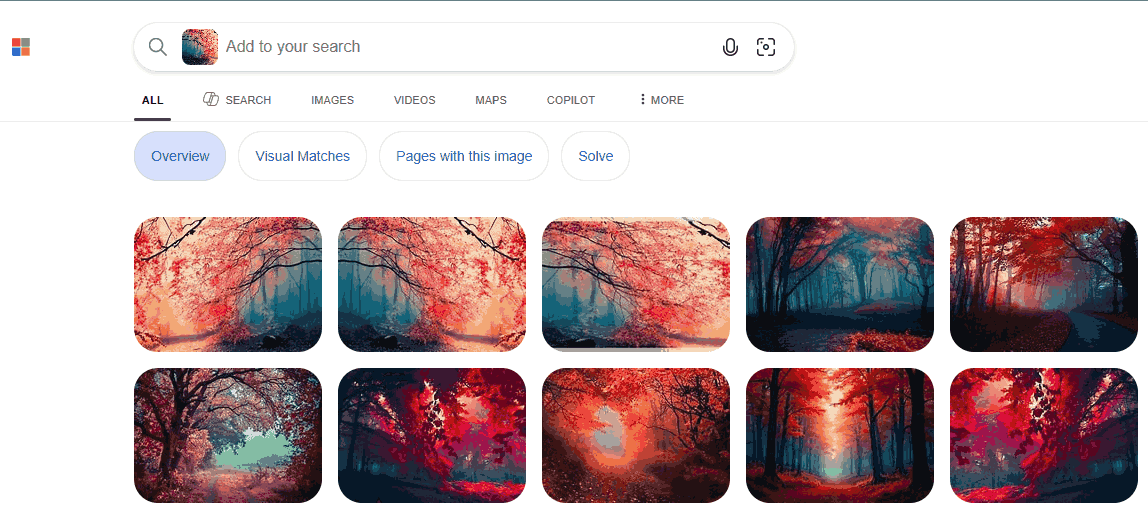
Bing's visual search is particularly strong for commercial product identification, often surfacing direct purchase links alongside image matches. Its object recognition and OCR (text extraction from images) are competitive with Google. Bing indexes different content than Google and frequently surfaces marketplace and retail images that Google misses.
Bing is the right engine for: product identification and shopping, commercial image tracking, and cases where Google returns no results.
Yandex Images
Yandex is the strongest freely available engine for facial recognition and for locating images connected to Eastern European web content. Its face search capability meaningfully exceeds what Google offers for non-celebrity faces, making it the default choice for catfish verification, social media profile authenticity checks, and investigative work involving people.
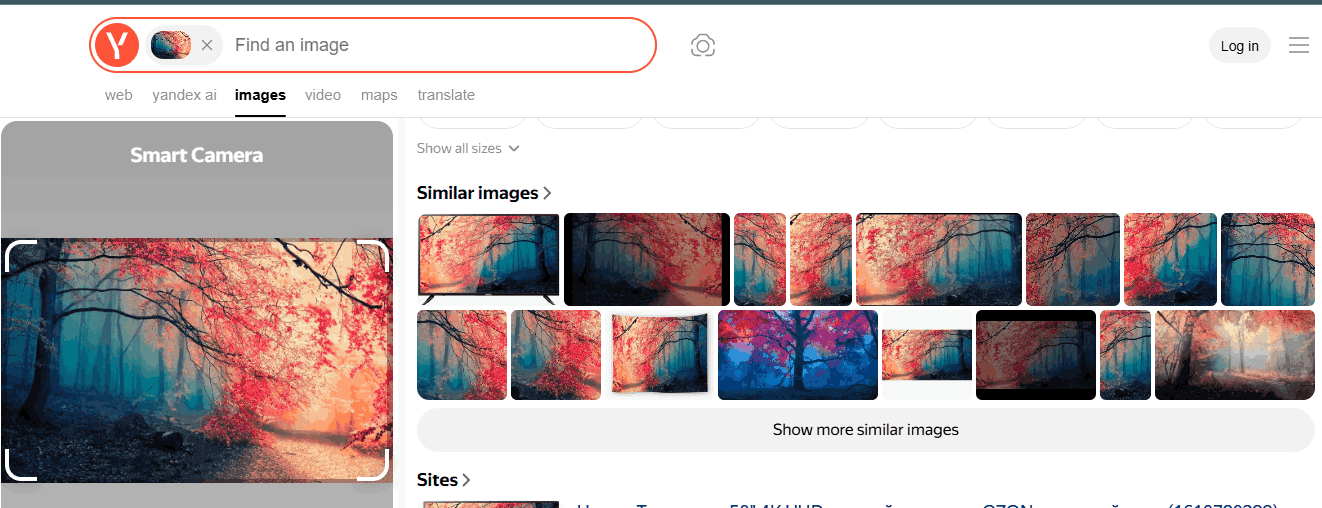
See our detailed Platform Comparison Guide for a complete walkthrough of how to use Yandex effectively and interpret its results.
SnapZain Free Reverse Image Search Tool
Our reverse image search tool does not maintain its own image index. Its value is aggregation and speed. It submits your image to Google, Bing, and Yahoo, applies the multi-engine technique without requiring you to visit three separate platforms, and returns results in a single workflow. The keyword field adds hybrid query capability that most free tools do not offer. No account, no app, no fee.
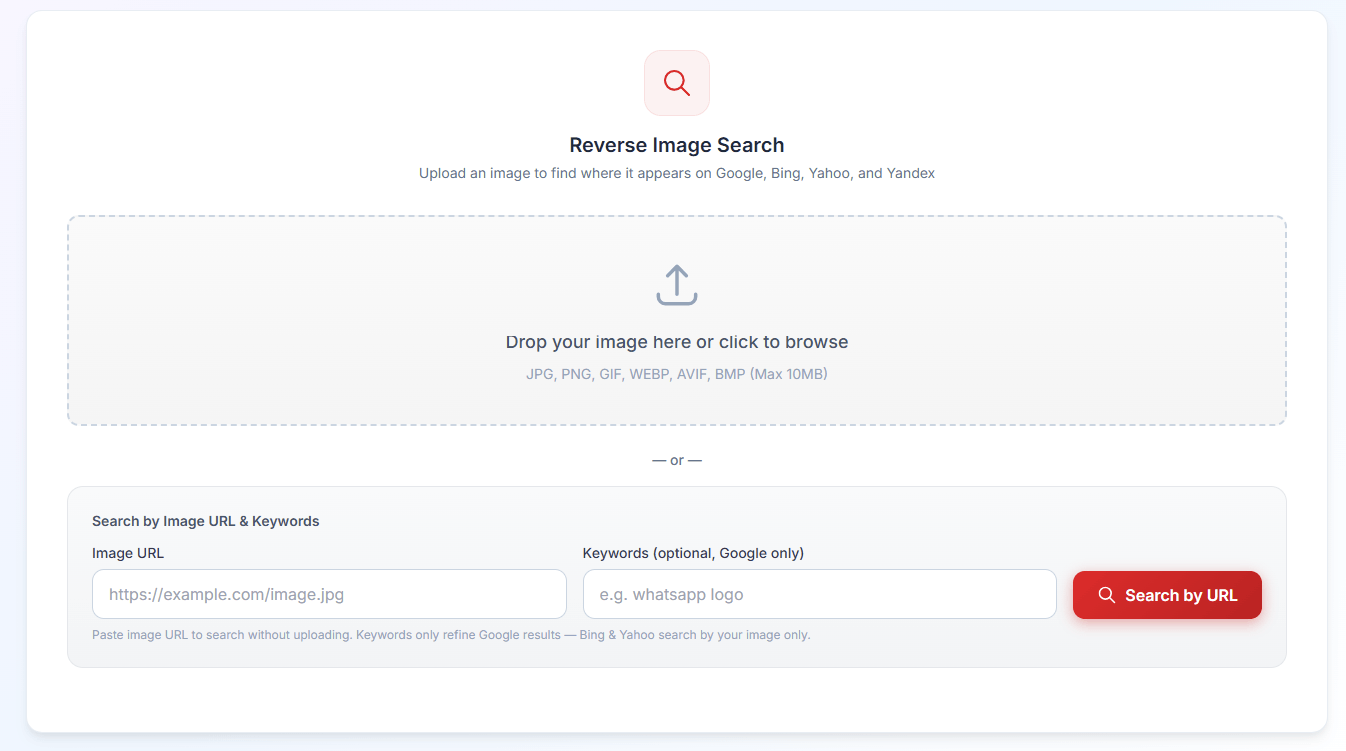
Snapzain's free reverse image search tool is the right starting point for: any reverse image search where thoroughness matters, copyright tracking across multiple platforms, and any situation where you are not certain which engine will have the answer.
Real-World Scenarios: Technique Matching in Practice
Abstract technique descriptions become clear when you see them applied to specific problems. These four scenarios each require a different reverse image technique, and produce different results depending on whether the right technique is chosen.
Scenario 1: The Recycled News Photograph
A regional news editor receives a dramatic photograph from a freelance contributor claiming the image was taken at a local protest last week. The image quality is high and the scene is credible. Prior to publication, the editor needs to confirm that the image is authentic.
The correct technique is exact match search combined with multi-engine search. The editor pastes the image URL into SnapZain reverse image search free tool and runs all three engines. Google returns a match: the same image appeared on an international news wire three years ago, attributed to a completely different event in a different country. The image is not published. The verification took less than two minutes.
Scenario 2: The Stolen Product Photo
An e-commerce seller photographs their handmade leather bags and lists them on their website. Six months later, a competitor appears to be using those images on their own listing on a different marketplace. The seller needs documented evidence.
The correct technique is keyword hybrid search. The seller pastes the URL of the competitor's listing image into SnapZain's tool URL field, adds their own brand name as a keyword, and runs the search. Bing surfaces three additional unauthorised listings on separate marketplaces that were not immediately visible to the seller. The seller now has evidence across four platforms to support a copyright takedown.
Scenario 3: The Suspicious Job Applicant
A recruiter receives a strong CV with a professional headshot. Something about the photograph looks familiar. The recruiter suspects the photo may have been taken from another professional's public LinkedIn profile or from a stock image library.
The correct technique is facial recognition search. The recruiter pastes the image URL into SnapZain free reverse image search tool. Google results surface the same face attached to three different names on two platforms. This is the signal that the application is fraudulent. For a deeper search, Yandex reverse image search would extend coverage further, particularly if the person's face appears on any Eastern European platform.
Scenario 4: The Archival Photograph
A history researcher finds an uncaptioned photograph in a digitised archive collection. The photograph shows people in early twentieth century clothing outside an unidentified institutional building. Proper attribution is required for academic citation.
The correct technique is exact match search across multiple engines, prioritising Yahoo and Bing because both have indexed more institutional and archival content than Google for this era. The researcher uploads the photograph to SnapZain free reverse image search online tool and runs all three engines. Yahoo's reverse image search results include a link to a museum digital collection that identifies the building, the organisation depicted, and the approximate year the photograph was taken. The researcher has a citable source within 90 seconds.
Why Does Your Reverse Image Techniques Produce Poor Results?
Knowing why a reverse image technique fails tells you exactly what to adjust. Every failure has an identifiable cause and a corresponding fix.
The Image Fingerprint Was Changed Before You Ran the Search
Any modification to an image, a horizontal flip, a color filter, a watermark addition, a crop, alters the mathematical fingerprint the algorithm computes. The degree of change determines whether results disappear entirely or simply degrade in accuracy.
Fix: Always search using the original, unmodified file. If only a modified version is available, try stripping the modification first (reverse the flip, convert to greyscale to remove color filter effects, crop out the watermark region).
- The Image Was Never Publicly Indexed
If an image has only ever existed as a private file, shared in a messaging app, stored behind a login wall, or hosted on a platform that blocks search engine crawlers, no engine has ever computed a fingerprint for it. No reverse image technique can find what is not in any index.
This is Not a Fixable Problem: The image simply has no searchable presence.
- You Reverse Image Searched Only One Engine
The most common and most avoidable reason for poor results. Google, Bing, and Yahoo each crawl different portions of the web. An image present on Bing's index may be completely absent from Google's. Searching one engine and concluding "no results exist" is almost always incorrect. SnapZain reverse image search free tool eliminates this error by searching all 3 simultaneously.
- The Image is Too Visually Generic
Images that share near-identical feature patterns with millions of other images, plain backgrounds, uniform textures, common objects without distinguishing characteristics, produce hash distances small enough to match thousands of unrelated indexed images. Results are technically correct but practically useless.
Fix: Apply Technique 3 (keyword hybrid) to add text context, or crop the image to isolate its most distinctive visual element before running the search.
- The Image Has Too Low Resolution
Low resolution images contain less visual data, which produces a less precise and less distinctive fingerprint.
Fix: use the highest resolution version available. If the only version available is low resolution, Bing Visual Search tends to handle lower quality inputs better than other engines.
For the complete technical explanation of why each of these failures occurs at the algorithm level, how fingerprints are computed, what changes them, and what the matching threshold means in practice, see our detailed guide on How Reverse Image Search Works.
Key Takeaways
Reverse image techniques are 5 distinct methods, not one tool with different buttons. Choosing the right technique for your specific goal determines whether you find a clear answer in 30 seconds or conclude incorrectly that no answer exists.
Exact match search finds copies. Visual similarity search finds related images. Keyword hybrid search filters noisy results. Facial and object recognition identifies subjects. Multi-engine search covers the gaps every single engine leaves.
For most searches, starting with SnapZain reverse image search tool,it applies exact match, keyword hybrid, and multi-engine search across Google, Bing, and Yahoo simultaneously, free, with no account. Add Yandex for face searches. Add TinEye when copyright tracking demands the strongest possible exact-match coverage.
Frequently Asked Questions
Which Reverse Image Technique Is Most Accurate?
Accuracy depends on your goal. For finding exact copies of a specific image, pixel fingerprint matching (exact match search) is most accurate, provided the image has not been substantially modified and has been indexed by at least one engine. For ensuring you have found every appearance of an image online, multi-engine search is the most thorough. Most professional users combine techniques rather than relying on one alone.
Are These Reverse Image Search Techniques Free To Use?
Yes. All 5 reverse image search techniques can be applied using free tools. SnapZain is free with no account required and covers exact match, keyword hybrid, and multi-engine search. Google Lens is free for visual similarity and object recognition. Yandex Images is free for face search. Paid tools exist for higher-volume professional use but are not necessary for most individual searches.
How Do I Find Where an Image Was Originally Published?
Use Technique 1 (exact match search) combined with Technique 5 (multi-engine search). Upload the image or paste its URL into SnapZain and search across Google, Bing, and Yahoo simultaneously. In the results, check publication dates shown beneath each matched page. The page with the earliest date is typically the original source, though always verified by visiting the page directly, as some aggregators republish content with older metadata.
Can Image Search Techniques Identify AI-generated Images?
Not reliably through standard reverse image search. If an AI-generated image was published online and indexed, a reverse image technique may find where it was published, but will not flag it as AI-generated. Identifying AI-generated images requires dedicated detection tools that analyse statistical patterns in pixel noise and the characteristic artifacts produced by generative models, which is a separate process from fingerprint comparison.
What is the Best Free Reverse Image Search For Finding Faces?
Yandex Images is the strongest freely available tool for face search, particularly for identifying faces associated with Eastern European web content. For public figures and social media profiles in Western markets, Google-based search via SnapZain often produces useful results as a first step.


