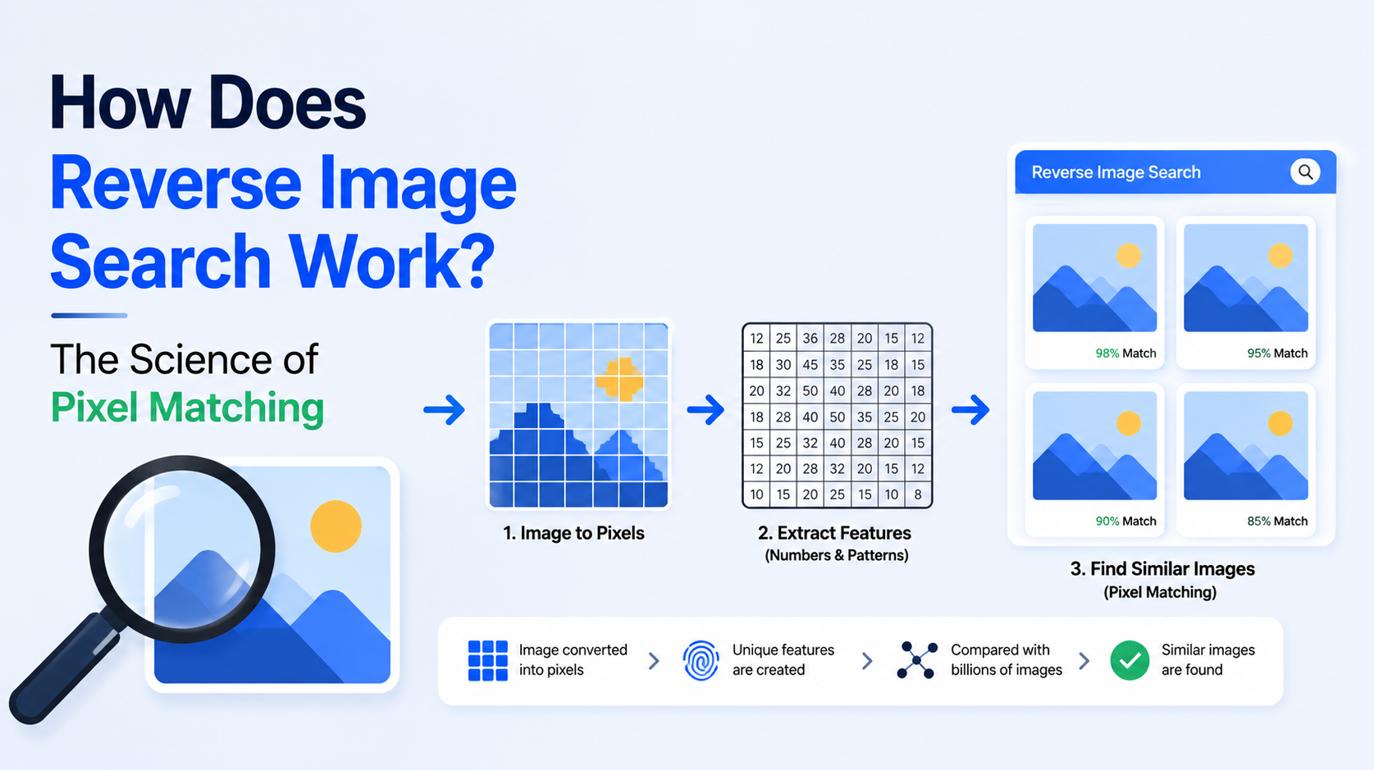
How Does Reverse Image Search Work? The Science of Pixel Matching
A reverse image search works by converting an uploaded image or photo URL into a unique mathematical fingerprint using a perceptual hashing algorithm. The search engine then calculates the numerical distance between this hash and billions of pre-indexed image signatures to locate exact duplicates or close visual matches across the web.
Most users think of Reverse Image Search Techniques as magic, but the reality is pure mathematics. Search engines do not "look" at photos the way human eyes do. Instead, they break the visual data down into a series of vectors, edges, and color histograms.
This guide breaks down exactly what happens during those milliseconds after you hit search, why certain image modifications break the algorithm, and how to structure your queries to get accurate results every time.
The Anatomy of an Image Fingerprint: Perceptual Hashing vs. Cryptographic Hashing
To understand how a reverse image search engine matches billions of files in seconds, you have to understand the image hashing algorithm.
When you upload a file, the engine does not compare your raw JPEG against every other JPEG on the internet. That would require an impossible amount of computing power. Instead, it generates an image fingerprint, a compressed string of alphanumeric characters representing the core visual data of the file.
There are two types of hashes, and visual search relies entirely on one of them:
When a search engine uses a perceptual hash, it is looking for structural similarities. The algorithm calculates the Hash Distance (often called the Hamming distance) between your uploaded image and the indexed images. A hash distance of zero means an exact duplicate. A small distance indicates a lightly edited or compressed version of the same file.
Behind the Code: How CBIR Algorithms Extract Color, Edges, and Textures
Before a pixel signature can be hashed, the content-based image retrieval system has to decide which parts of the image actually matter. If it analyzed every single pixel of a 4K image, the search would take hours.
Instead, the algorithm filters the image through several extraction layers:
- Grayscale Conversion: The engine strips the color data first to focus on contrast and structure, which are computationally lighter to process.
- Edge Detection: The algorithm maps the sharp transitions between light and dark areas. This helps the engine outline the primary subjects, like a building, a face, or a car, separating them from the background.
- Color Histograms: The system calculates the proportional distribution of colors. It notes that an image is 40% blue (sky), 30% green (grass), and 30% gray (road).
- Texture Mapping: The engine analyzes repeating patterns, like the woven fabric of a shirt or the brickwork of a wall.
By combining these data points, the engine creates a robust visual profile. This is how search engines including SnapZain Reverse Image Search tool find any image, suggesting a different photograph of the same landmark or a similar piece of clothing, even if the exact photo is not in their database.
Why Flipping, Cropping, or Compressing Changes the Pixel Signature?
Understanding how the algorithm maps edges and color histograms explains why certain searches fail. If you run an image search technique and get zero results, the tool isn't necessarily broken; the image metadata and visual structure may have been altered too drastically for the engine to recognize it.
Here is how common modifications disrupt a reverse search:
- Flipping/Mirroring: Flipping an image horizontally completely reverses the edge detection map. To a perceptual hashing algorithm, a mirrored image looks like an entirely different photograph.
- Heavy Cropping: If you crop out 40% of an image to isolate a person's face, the color histogram and texture mapping change dramatically. The original image might have been 50% sky, but your cropped version is 90% skin tones. The hash distance becomes too great to match.
- Aggressive Compression: Repeatedly saving a JPEG degrades the pixel data. While perceptual hashes are designed to survive minor compression, heavy artifacting destroys the edge data the algorithm relies on.
- Watermarks and Text Overlays: Adding text alters the structural geometry of the image. The algorithm tries to map the text as a core object, which skews the final fingerprint away from the clean original version.
To fix these issues, you must revert the image as close to its original state as possible before uploading it.
How SnapZain Reverse Image Search Tool Executes Multi-Engine Hashing Under 60 Seconds?
Because no single database contains every image on the internet, relying on one engine limits your results. An image might be indexed by Yahoo's historical crawl but ignored by Google's current algorithm.
When you use the SnapZain free reverse image search tool, you bypass the limitations of single-engine architecture.
- You upload the file or paste the direct image URL.
- The tool instantly routes your visual query through Google, Bing, and Yahoo on the selection of each search engine.
- Each respective engine applies its proprietary CBIR protocols to generate a hash and query its distinct database.
- You receive three separate search engines, allowing you to cross-reference exact matches, similar images, and earlier publication dates without running manual searches.
If you are trying to locate the absolute original source of a photograph, combining multiple databases is non-negotiable. To see how these databases stack up against each other, review our breakdown of the Best Reverse Image Search Tool options for 2026.
Final Thoughts: Controlling the Pixels
At its core, reverse image searching is a game of math and margins. By transforming raw pixels into a highly compressed perceptual hash, search engines can map the visual landscape of the web in fractions of a second. Understanding that the algorithm values stable structural data, like edges and textures, over volatile metadata gives you an immediate advantage.
The next time an image search comes up empty, don’t immediately conclude the image cannot be traced. Try reversing edits, removing heavy crops or flipped orientations, and use multiple search engines to explore every possible digital source.
Frequently Asked Questions
What is the Most Accurate Image Hashing Algorithm?
Perceptual hashing (pHash) is generally considered the most accurate for finding visual matches because it survives minor image alterations like resizing or slight compression. For identifying absolute exact, pixel-perfect duplicates, cryptographic algorithms like SHA-256 are more precise, but they are rarely used in commercial reverse image search engines.
Why Do Some Reverse Image Search Techniques Return Completely Unrelated Photos?
This happens when an image is visually generic. If you upload a photo of a clear blue sky over a green field, the color histogram and edge detection data will match millions of other photos. The algorithm returns results with a close hash distance, even if the subjects are completely unrelated.
Does Changing The File Name Affect the Reverse Image Search?
No. A reverse image search relies on Content-Based Image Retrieval, meaning it analyzes the visual pixel data inside the file, not the file name. You can rename a file from "IMG_9942.jpg" to "Unknown_Photo.jpg" and the search engine will generate the exact same image fingerprint.


